Laser Files (DXF/SVG)

Other skills

I prepare vector drawings in DXF and SVG for laser workshops: signs, lettering, symbols and gifts, ready for cutting and engraving.

How I use Laser Files (DXF/SVG)

I also build configurators where the customer picks a product and sees the price right away.

The workshop gets a file that goes straight into the machine without fixes: correct dimensions, closed paths and text converted to curves. That means less wasted material and prep time, and a configurator saves time on inquiries because customers see the price themselves.

In practice I draw at real scale in millimeters, keep cutting and engraving on separate layers, and check that no lines overlap, since the laser would cut the same path twice. For cut-out letters I add bridges so the inner parts of letters like O and A don't fall out, and for parts that fit together I account for the kerf. I prepare files for both wood and sheet metal.

In configurators I calculate the price on the server so it always matches the workshop's price list, using React and Supabase, and the customer downloads a PDF quote at the end.

Used in: Laser Wood configurator, LaserWood Design.

Projects using Laser Files (DXF/SVG)

Websites and apps I built where Laser Files (DXF/SVG) was used.

  • LaserWood Design — Laser Cutting and Engraving Website

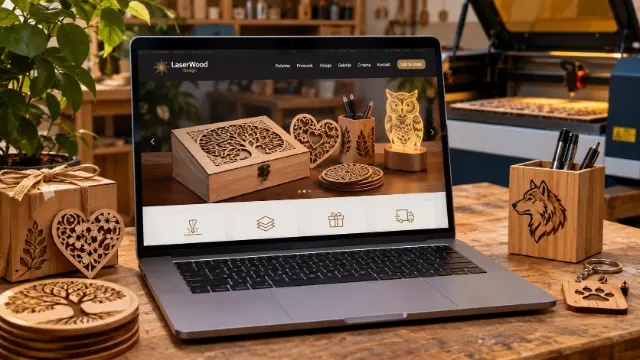
    LaserWood Design — Laser Cutting and Engraving Website

    A business website for LaserWood Design, a workshop for laser cutting, engraving and personalized gifts. Five pages: home, services, gallery, contact and privacy policy. The gallery holds more than 150 photos of finished work that open in a full-size view, and the image list is generated automatically as soon as a new photo is added to the folder, so the owner never touches the code. Contact goes through Viber, WhatsApp, Instagram and TikTok. Plain HTML, CSS and JavaScript with basic SEO, hosted for free on GitHub Pages.

  • Laser Wood Design — Price Configurator and Storefront

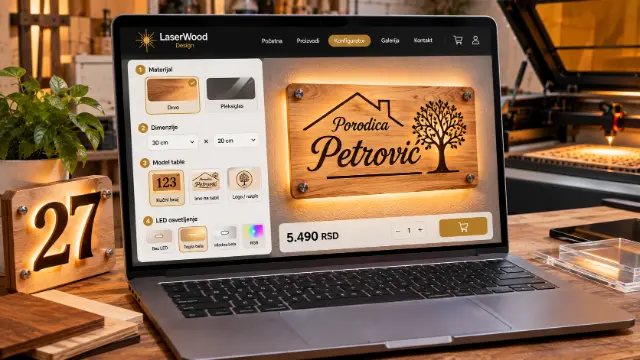
    Laser Wood Design — Price Configurator and Storefront

    A website with a configurator for Laser Wood Design from Pančevo, Serbia, a workshop making laser-engraved signs, keychains and 3D letters. The customer picks the material, size, model and LED lighting, sees a live preview of the sign and gets the price instantly, then sends an inquiry and downloads a PDF quote. The price is calculated on the server, so it always matches the workshop's price list. From the admin panel the owner manages materials and prices, the gallery, reviews and FAQ and tracks incoming inquiries. Built with React and Supabase, with automated tests and code checks on every change.

Frequently asked questions about Laser Files (DXF/SVG)

What is a DXF file?

DXF is a vector drawing format from CAD software that most laser and CNC machine programs can read. It holds lines and curves at real dimensions, so the machine knows exactly where to guide the laser.

DXF or SVG for laser cutting: what's the difference?

Both are vector formats, but DXF comes from the CAD world and is what cutting software usually expects, while SVG is a design and web format. When a machine works with DXF, I send DXF in millimeters, and SVG is handy for previewing and further editing.

Do you make custom laser files?

Yes, I prepare DXF and SVG files for signs, lettering, symbols and gifts, ready for the machine. In this area I've worked on the Laser Wood configurator, where the customer picks material, size and LED lighting and gets a price instantly, and on LaserWood Design.

How much does a website or app built with Laser Files (DXF/SVG) cost?

It depends on the type of project: Business Website — Standard from €230; Price Configurator for Your Website from €410. These are starting prices; you get the final price and timeline in a written offer by email.

All skills →